
Grading Calculator
Teachers need two kinds of grading maths: a quick chart that turns “number wrong” into a percentage for every test, and a weighted calculation that turns category averages into a course grade. This calculator does both on your own grading scale, and adds a “what do I need on the final?” calculator for students.
- Free to use
- No sign-up
- Runs in your browser
Grading calculator
Teacher Grading Pack
Printable easy-grader charts for 5 to 50 questions, a weighted gradebook spreadsheet, a grading scale reference card and a rubric template.
- Easy grader charts (PDF/XLSX)
- Weighted gradebook (XLSX)
- Scale card (PDF)
- Rubric template (DOCX/PDF)
Formats: PDF, XLSX, DOCX. Instant download after payment (link valid 72 hours, up to 5 downloads). AI-assisted: the templates were drafted with AI help and reviewed and laid out before publishing.
$5.00 USD, one-time 4 files · about $1.25 each
- Instant download
- 7-day refund
- Secure checkout by Stripe
7-day money-back guarantee. Full refund within 7 days of purchase, even after you download.
Free sample: Easy Grader Charts (PDF, 52 KB)
Full refund within 7 days — see the refund policy and license.
Free printables
Single sheets you can print right now, no sign-up. The full pack adds every sheet in one download plus the editable files.
 Printable Grading Rubric Template
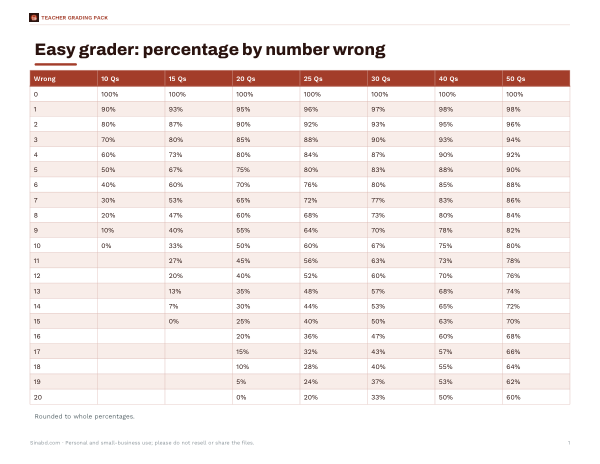
The test grader (easy grader)
For a test with n equally weighted questions, each one is worth 100 ÷ n percent, and the score is (n − number wrong) ÷ n × 100. The chart lists every possible number wrong with its percentage and letter grade, which teachers print and keep beside the marking pile. It works for points too: enter the total points and read the score for each number of points lost.
Common grading scales
| Scale | Boundaries |
|---|---|
| US standard | A 90–100, B 80–89, C 70–79, D 60–69, F below 60 |
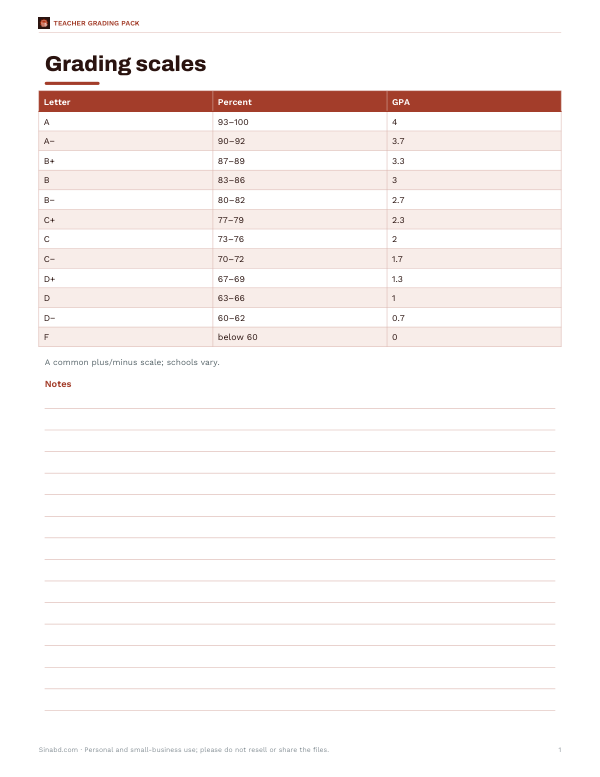
| US with plus/minus | A 93+, A− 90, B+ 87, B 83, B− 80, C+ 77 … D− 60 |
| 4.0 GPA points | A 4.0, B 3.0, C 2.0, D 1.0, F 0 (A− 3.7, B+ 3.3 etc.) |
| UK university classifications | First 70+, Upper second (2:1) 60–69, Lower second (2:2) 50–59, Third 40–49 |
Schools and universities set their own boundaries — some use 94 for an A, others weight honours courses — so check the syllabus or handbook. The calculator lets you switch scales.
Weighted grades
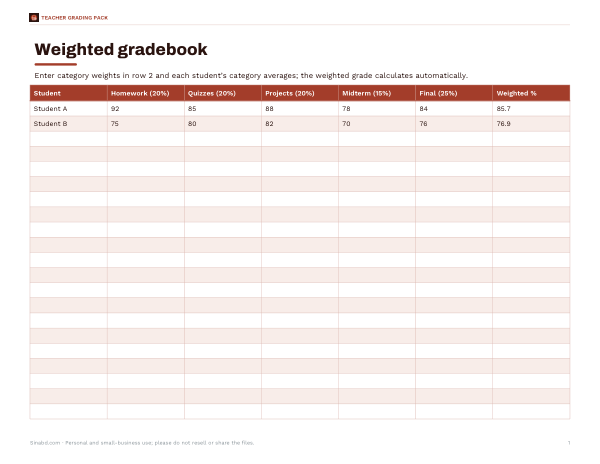
Most courses weight categories differently. The weighted grade is Σ(weight × score) ÷ Σ(weights of graded categories). With homework 20% at 92, quizzes 20% at 85, projects 20% at 88 and a midterm 15% at 78, and the final (25%) not yet taken, the current grade is (20×92 + 20×85 + 20×88 + 15×78) ÷ 75 = 86.3%. The calculator shows each category’s contribution so it is clear where points were gained or lost.
What do I need on the final?
If the final exam is worth w percent of the grade and your current grade (on everything else) is c, the score needed to reach a target t is (t − c × (1 − w)) ÷ w. With a current 84% and a 25% final, reaching 85% needs (85 − 84 × 0.75) ÷ 0.25 = 88%. The table shows the course grade for a range of final scores so you can see the stakes.
Worked example: grading a 25-question quiz
A teacher marks a 25-question quiz. Each question is worth 4%, so 3 wrong is 88% (a B on the standard scale, B+ with plus/minus boundaries), 5 wrong is 80% and 8 wrong is 68% (a D). The printed chart for 25 questions goes beside the marking pile, and grades are entered in seconds. At the end of term, the weighted calculator combines the quiz average with homework, projects and exams.
Rounding and borderline grades
Decide in advance how to round. Some teachers round final percentages to the nearest whole number (89.5 becomes 90), others truncate (89.9 stays 89), and some review borderline students individually. The calculator shows two decimal places for weighted grades so you can apply your own rule consistently. For test scores, the rounding option in the test grader switches between whole percentages and one decimal place.
Points-based vs weighted grading
| System | How it works | Watch out for |
|---|---|---|
| Total points | Add all points earned ÷ all points possible | Big assignments automatically count more; category balance depends on point totals |
| Weighted categories | Average each category, then weight | A category with one assignment can swing the grade |
| Standards-based | Scores per learning standard (e.g. 1–4) | Needs a conversion to letters if the school requires them |
Switching systems mid-term can change students’ grades noticeably, so explain any change clearly.
Converting percentages to GPA
On a typical 4.0 scale, each letter grade maps to grade points — A 4.0, B 3.0, C 2.0, D 1.0 and F 0, with plus and minus grades in between at many schools. A grade point average multiplies each course’s points by its credit hours, adds them up and divides by the total credits. Weighted GPAs add extra points for honours or advanced courses, which vary by school, so this calculator shows unweighted points.
Extra credit and dropped scores
Extra credit is usually added either to a category (for example a few bonus quiz points) or to the final percentage; the effect is different, so check which your teacher uses. Dropped lowest scores are removed before the category average is taken. Enter the category averages after applying these adjustments, and the weighted result will match the gradebook.
For students: checking your grade
- Find the category weights in your syllabus.
- Average your scores within each category.
- Enter them in weighted mode, leaving future categories blank.
- Use final exam mode to see what you need.
- If numbers differ from your school’s portal, ask your teacher — there may be dropped scores or extra credit.
Knowing exactly where you stand makes study planning easier than guessing.
Fair grading tips
- Publish the scale and weights at the start of the course.
- Use the same rounding rule for everyone (for example, round 89.5 up to 90).
- Check that weights add to 100%.
- Consider dropping the lowest quiz score to reduce the impact of one bad day.
- Keep records that let students see how their grade was calculated.
Privacy
Everything is calculated in your browser; no student data is uploaded or saved.
Frequently asked questions
How do I calculate a test percentage?
Right answers ÷ total questions × 100.
What is 3 wrong out of 25?
88%.
How do I calculate a weighted grade?
Multiply each category score by its weight, add them, and divide by the total weight graded.
What do I need on my final to get an A?
Use the final exam mode: needed = (target − current × (1 − weight)) ÷ weight.
What GPA is a B+?
Commonly 3.3 on a 4.0 scale.
Is my data saved?
No. It stays in your browser.
What is 8 wrong out of 40?
80%.
Can I use a different grading scale?
Choose standard, plus/minus or UK classifications; for others, read the percentage and apply your school’s boundaries.